


Find out why over 1.2 million users choose Supremo Every day
-

Supremo Solo
From 33,00 € No Taxes -
Supremo Business
From 59,00 € No Taxes -
Supremo Professional
From 128,00 € No Taxes
Why just Supremo (remote desktop)
SINGLE AND MALEN
Its intuitive interface is easy to use. Supremo consists of a small executable file that does not require installation and configuration of the router or firewall.
SECURITY
Connect to a remote device and upload your files with complete security thanks to the AES 256-bit algorithm and UAC compatibility. Access to the client requires entering an ID and a dynamic password (or static if set manually).
COMPANY USE SPREMAN
No human intervention is required to initiate a remote session: You can automatically activate Supremo when the remote computer starts Windows. All plan subscribers can also customize the software interface with their own brand or logo and distribute it to their customers.
FULLY ACCEPTABLE
Subscribe to one of our affordable plans to use Suprema without restrictions and use its full potential. However, for non-professional and/or non-permanent use, you can use and upgrade to new versions for free.
Download for any platform or device
Download for any platform or device

Windows

macOS

Android

iOS

Mobile Assist
From 5/€/month
Unlimited installation
Customizable interface to needs
Direct support
Free updates
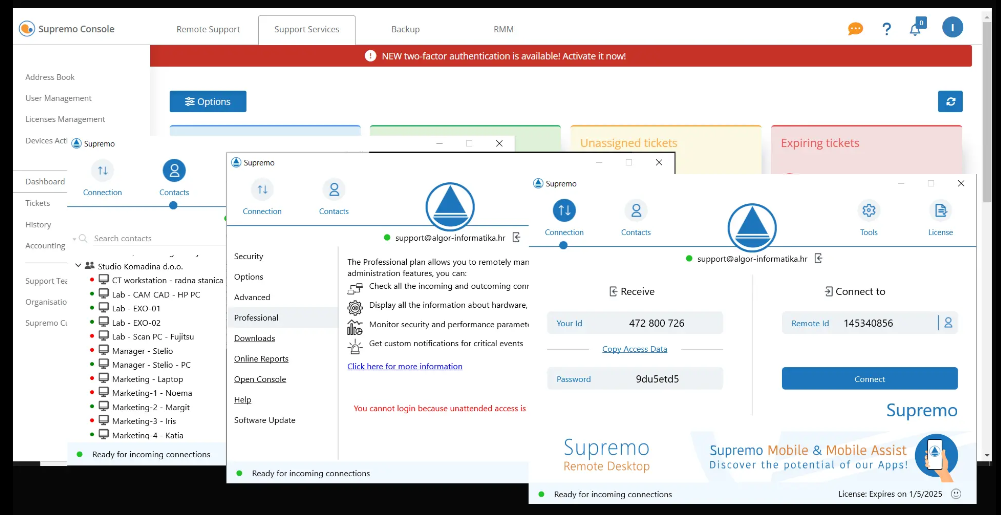
An excellent tool for fast and secure data transfer between devices
ACCESS WITHOUT ASSESSMENT
Just a few clicks to install and unobstructed access to unsupervised computers or servers.
TRANSFER OF DATA
Secure and reliable remote transfer of files to share files and folders between computers during remote sessions.
ONLINE REPORT
Collect, view, filter and export information related to outgoing links...
DALJINIC EXPERIENCE
Work on a document stored on a remote device and simply print it out on your local printer...
Supremo Professional
RMM, support queue and advanced features
Use Supremo professional solutions to provide your customers with the best service
Support Order
Activate the support queue and receive requests from your customers.
Automatic and mass implementation
Configure and install Supremo automatically and en masse.
Advanced custom configuration
Create custom Supremo clients with advanced features.
Control of License Usage
Monitor your license usage in real time.
Remote control of the device
View all information about your device in real time.
Checking the correctness of the device
Define the monitoring rules and set the parameters for assessing the health status of the device.
Link tracking
View all incoming and outgoing connections from devices connected to your account.
Patch management
Automate critical updates for your Windows systems.
Process management
Track Windows processes and events to optimize performance.
License sharing
Allow employees or associates to use your subscription plan.
Invoicing of remote support
Calculate support costs and automatically receive billing reports.
User management
Create and control users and share functionalities with co-workers.


 Support inquiries
 EN
EN  HR
HR  SL
SL  BS
BS